.svg)
.svg)
.svg)

.png)

Emailing your resume might sound easy, but the language you use can go a long way in making or breaking the decision by a recruiter to either open your application or not. In a competitive employment market, your email becomes the initial impression- it is often read even before your resume is opened. Knowing what to write in the email when sending resume can make the difference between getting shortlisted or ignored.
This guide will deconstruct best practices, real-life examples, and clever tips to write professional, effective emails that stand out, as well as demonstrate how such tools as ORO AI help to make the process smoother to get better outcomes.
Why Your Resume Email Matters More Than You Think
Those who do the hiring get hundreds of applications every day. Even a good resume becomes unprofessional when the email is poorly written. On the other hand clear and to-the-point email for sending a resume sets the right tone and shows attention to detail.
Your email should:
● Clearly state your intent
● Highlight your suitability briefly
● Encourage the recruiter to open your resume
● Align with ATS and hiring best practices
Essential Elements of a Professional Resume Email
It is essential to have a knowledge of the general outline that any resume email must use before citing examples.
1. A Clear and Relevant Subject Line
Once somebody gets your email he or she should be able to read your subject line and know what this email is about. Be specific and do not use ambiguous words and phrases.
Example:
John Doe is seeking a Marketing Executive position.
This will ensure that recruiters find your application fast in unresponsive inboxes..
2. Professional Greeting
Every chance to address the hiring manager by name. Otherwise a respectful general greeting is effective.
Examples:
● Dear Hiring Manager,
● Hello Recruitment Team,
Avoid informal greetings like “Hi there” or “Hey.”
3. Opening Line- State Your Purpose Clearly
The initial sentence must give the purpose of your writing. This is where transparency is important.
This is the foundation of what to write in the email when sending resume, and it should be direct and professional.
4. Brief Body Paragraph Highlighting Your Value
Make this section brief 2 or 3 lines only. Mention:
● Your current role or expertise
● The position you’re applying for
● One key strength or achievement
Do not be repetitive of your resume content. Rather than that, provide a reason to read it.
5. Mention Attachments Clearly
Always ensure you state that your resume is attached and attach any other documents such as a cover letter.
This improves clarity and professionalism especially when using an email template to send CV.
6. Polite Closing and Signature
Close by saying goodbye, and add your complete name and contact details and your LinkedIn profile (where necessary).
Resume Email Sample for Job Applications
Here’s a professional resume email sample you can adapt:
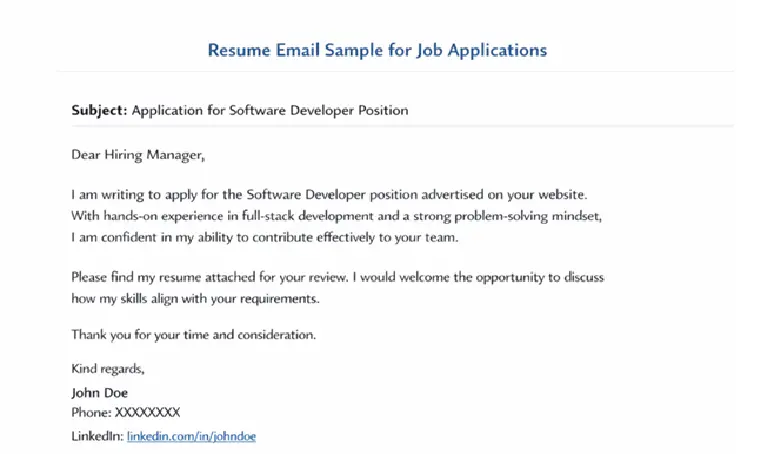
This structure works well across industries and roles.
Do You Need a Cover Letter with Your Resume Email?
Yes, when possible. By attaching a cover letter to a resume, you are able to add some color to your application and customize your pitch. It also shows that it is professional and hard working when it is not obligatory.
You can use modern assistants such as ORO AI to create custom cover letters that fit job descriptions, which saves time and quality at the same time.
ATS Considerations When Sending Resume Emails
Applicant Tracking Systems (ATS) are widely used by many companies to scan applications. That’s why using an ats friendly resume is crucial.
To stay ATS-compliant:
● Use simple formatting
● Avoid images or tables in resumes
● Save files as PDF or DOCX with clear filenames
● Use standard job-related keywords
ORO AI will guarantee that your resume design and content are ATS-optimized, which means that you are more likely to pass through automated checks.
Common Resume Email Mistakes to Avoid
Even qualified candidates get rejected due to small mistakes. Avoid:
● Empty email body with only attachments
● Spelling or grammar errors
● Casual language or emojis
● Forgetting to attach the resume
● Using unprofessional email addresses
Automation tools can assist in the eradication of such errors by showing best practices.
How ORO AI Helps You Send Better Resume Emails
ORO AI is tailored to assist job seekers in ways other than resume development. It helps you:
● Craft professional resume emails
● Generate personalized cover letters
● Ensure ATS compatibility
● Align your application with job requirements
● Maintain consistency across resumes and emails
ORO AI automates the job search process without making the process intricate but enhances the chances of success.
Final Thoughts
Knowing what to write in the email when sending resume is an essential skill in today’s digital hiring landscape. A good email will improve your resume. It will make your first impression better. Not only this it will also increase the interest of the recruiter.
With these best practices and the help of smart technology like ORO AI it is possible to submit confident and professional applications that will be memorable and get you one step closer to the interview.




.svg)